

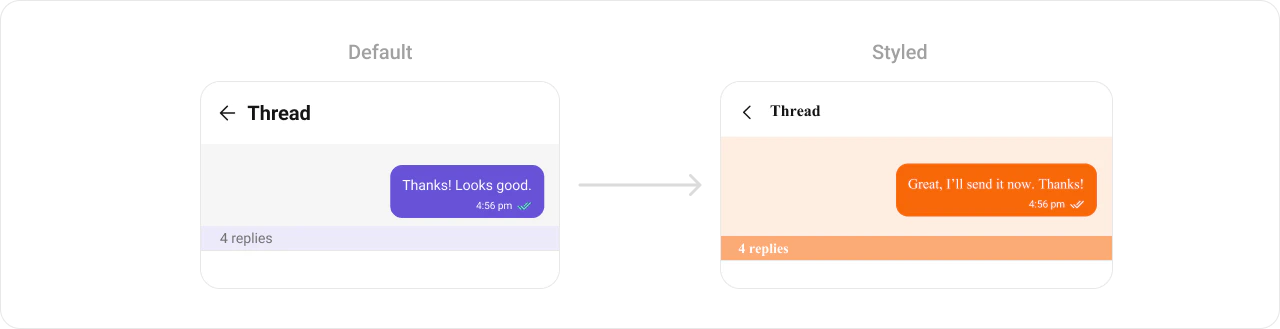
CometChatThreadHeader renders the parent message bubble and reply count for a threaded conversation. It requires a parent message to display.

Where It Fits
CometChatThreadHeader is a header component for threaded message views. Wire it above a CometChatMessageList and CometChatMessageComposer to build a complete threaded conversation layout.
- Kotlin (XML Views)
- Jetpack Compose
activity_thread.xml
Quick Start
- Kotlin (XML Views)
- Jetpack Compose
Add to your layout XML:Set the parent message — this is required:
CometChatUIKit.init(), a user logged in, and the UI Kit dependency added.
Actions and Events
Callback Methods
CometChatThreadHeader is a display-only header. It does not expose component-specific callbacks like setOnItemClick or setOnError.
SDK Events (Real-Time, Automatic)
The component listens to SDK events internally via its ViewModel. No manual setup needed.| SDK Listener | Internal behavior |
|---|---|
| Message edited | Updates the parent message bubble |
| Message deleted | Updates the parent message bubble |
| Reply count changed | Updates the reply count indicator |
Functionality
| Method (Kotlin XML) | Compose Parameter | Description |
|---|---|---|
setParentMessage(message) | parentMessage = message | Set the parent message (required) |
setUser(user) | user = user | Set the user context |
setGroup(group) | group = group | Set the group context |
setReactionVisibility(View.GONE) | hideReactions = true | Toggle reactions on parent bubble |
setAvatarVisibility(View.GONE) | hideAvatar = true | Toggle avatar visibility |
setReceiptsVisibility(View.GONE) | hideReceipts = true | Toggle read receipts |
setReplyCountVisibility(View.GONE) | hideReplyCount = true | Toggle reply count text |
Style
- Kotlin (XML Views)
- Jetpack Compose
Define a custom style in
themes.xml:themes.xml
ViewModel
- Kotlin (XML Views)
- Jetpack Compose
Next Steps
Message List
Display messages in a conversation
Message Header
Display user/group info in the toolbar
Message Composer
Rich input for sending messages
Conversations
Browse recent conversations