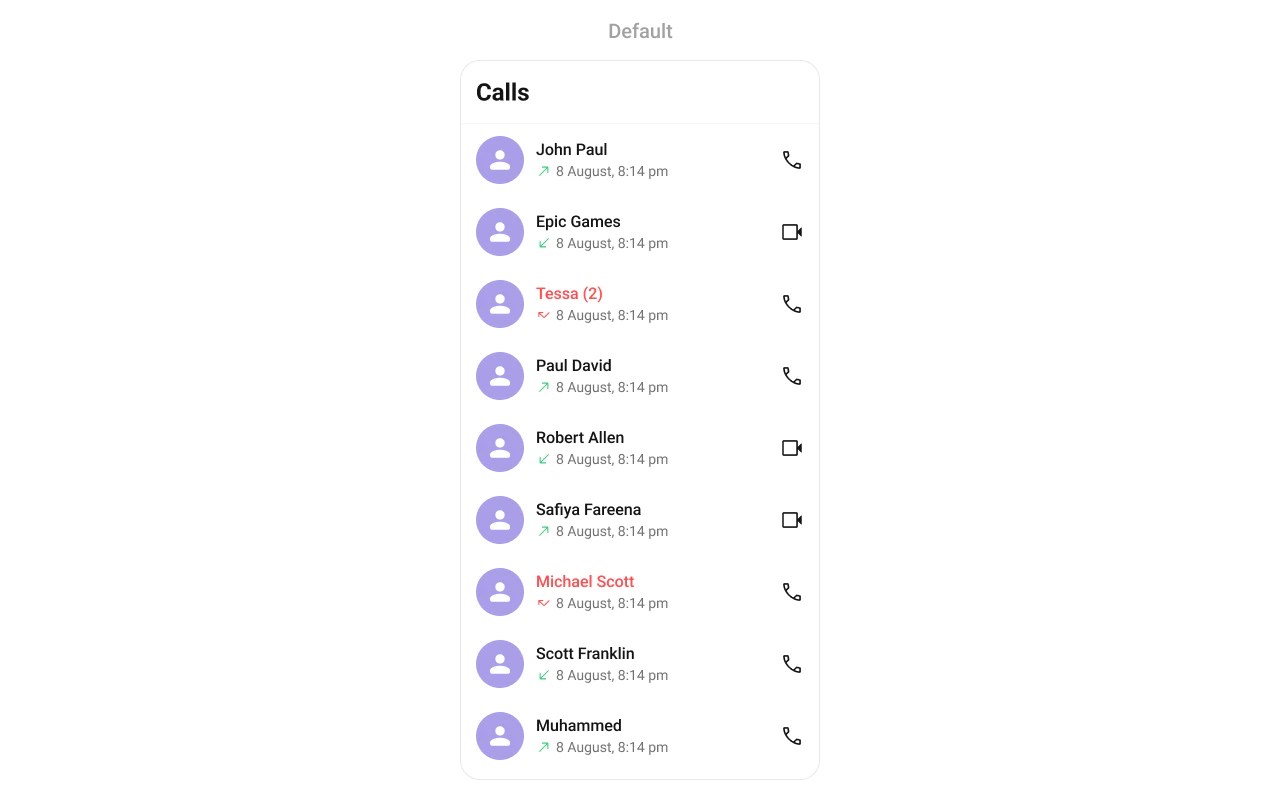
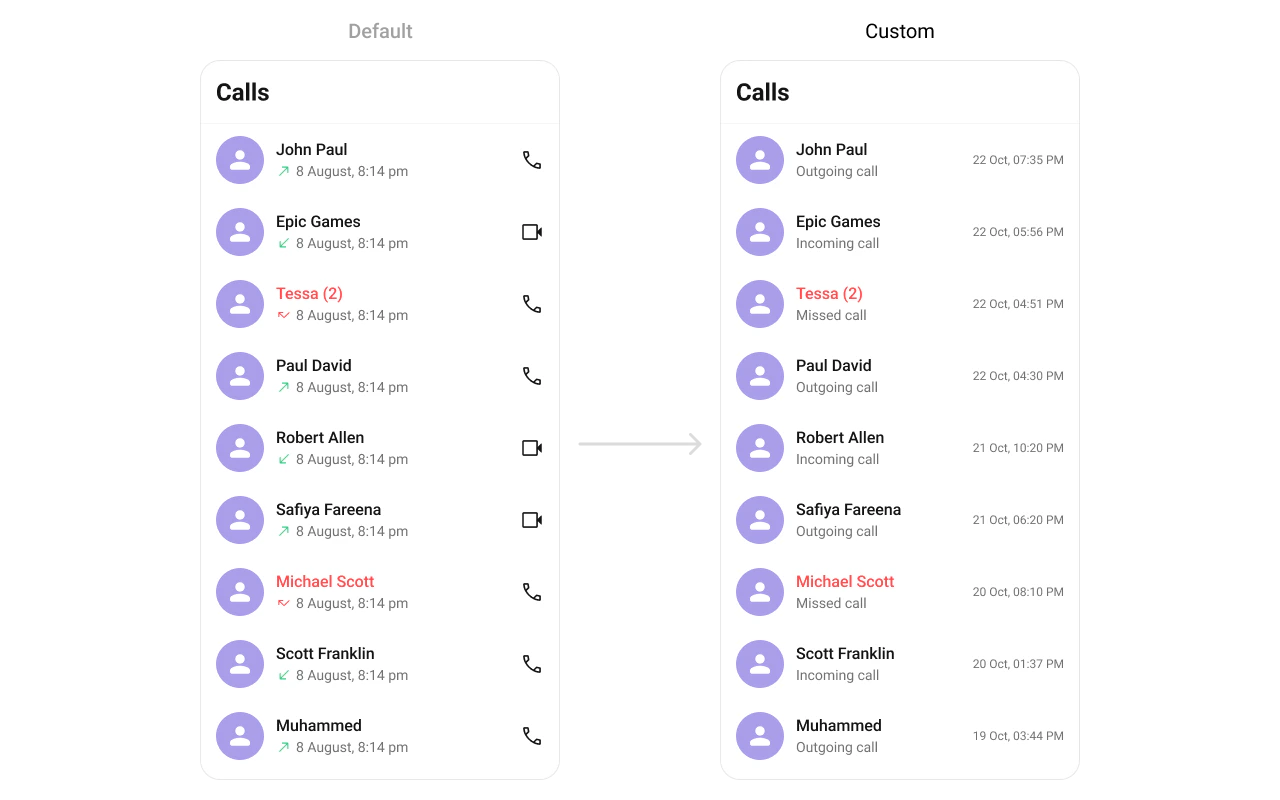
CometChatCallLogs renders a scrollable list of call logs for the logged-in user with caller names, avatars, call status indicators, and timestamps.Where It Fits CometChatCallLogs is a list component. It renders the user’s call history and emits the selected CallLog via onItemClick. Use it as a standalone call history screen or as a tab in a tabbed layout alongside conversations and contacts. Kotlin (XML Views)
Jetpack Compose
< com.cometchat.uikit.kotlin.presentation.calllogs.ui.CometChatCallLogs android:id = "@+id/call_logs" android:layout_width = "match_parent" android:layout_height = "match_parent" />
val callLogs = findViewById < CometChatCallLogs >(R.id.call_logs) callLogs. setOnItemClick { callLog -> // Navigate to call detail or initiate call }
CometChatCallLogs ( modifier = Modifier. fillMaxSize (), onItemClick = { callLog -> // Navigate to call detail or initiate call } )
Quick Start Kotlin (XML Views)
Jetpack Compose
Add to your layout XML: < com.cometchat.uikit.kotlin.presentation.calllogs.ui.CometChatCallLogs android:id = "@+id/call_logs" android:layout_width = "match_parent" android:layout_height = "match_parent" />
Or programmatically: override fun onCreate (savedInstanceState: Bundle ?) { super . onCreate (savedInstanceState) setContentView ( CometChatCallLogs ( this )) }
@Composable fun CallLogsScreen () { CometChatCallLogs ( modifier = Modifier. fillMaxSize () ) }
Prerequisites: CometChat SDK initialized with CometChatUIKit.init(), a user logged in, the UI Kit dependency added, and the CometChat Calls SDK configured.
Or in a Fragment:
Kotlin (XML Views)
Jetpack Compose
override fun onCreateView (inflater: LayoutInflater , container: ViewGroup ?, savedInstanceState: Bundle ?): View { return CometChatCallLogs ( requireContext ()) }
override fun onCreateView (inflater: LayoutInflater , container: ViewGroup ?, savedInstanceState: Bundle ?): View { return ComposeView ( requireContext ()). apply { setContent { CometChatCallLogs () } } }
Filtering Call Logs Kotlin (XML Views)
Jetpack Compose
Pass a CallLogRequest.CallLogRequestBuilder to control what loads: callLogs. setCallLogRequestBuilder ( CallLogRequest. CallLogRequestBuilder () . setLimit ( 20 ) . setCallCategory (CometChatConstants.CALL_CATEGORY_CALL) )
CometChatCallLogs ( callLogRequestBuilder = CallLogRequest. CallLogRequestBuilder () . setLimit ( 20 ) . setCallCategory (CometChatConstants.CALL_CATEGORY_CALL) )
Filter Recipes Recipe Builder method Limit per page .setLimit(10)Audio calls only .setCallType(CometChatConstants.CALL_TYPE_AUDIO)Video calls only .setCallType(CometChatConstants.CALL_TYPE_VIDEO)Call category .setCallCategory(CometChatConstants.CALL_CATEGORY_CALL)
Pass the builder object, not the result of .build(). The component calls .build() internally. Default page size is 30 with infinite scroll.
Actions and Events Callback Methods onItemClickFires when a call log row is tapped. Primary navigation hook.
Kotlin (XML Views)
Jetpack Compose
callLogs. setOnItemClick { callLog -> // Navigate to call detail }
CometChatCallLogs ( onItemClick = { callLog -> // Navigate to call detail } )
Replaces the default item-click behavior. Your custom lambda executes instead of the built-in navigation.
onItemLongClickFires when a call log row is long-pressed.
Kotlin (XML Views)
Jetpack Compose
callLogs. setOnItemLongClick { callLog -> // Show context menu }
CometChatCallLogs ( onItemLongClick = { callLog -> // Show context menu } )
onBackPressFires when the user presses the back button in the toolbar.
Kotlin (XML Views)
Jetpack Compose
callLogs. setOnBackPress { finish () }
CometChatCallLogs ( onBackPress = { /* navigate back */ } )
onErrorFires on internal errors (network failure, auth issue, SDK exception).
Kotlin (XML Views)
Jetpack Compose
callLogs. setOnError { exception -> Log. e ( "CallLogs" , "Error: ${ exception.message } " ) }
CometChatCallLogs ( onError = { exception -> Log. e ( "CallLogs" , "Error: ${ exception.message } " ) } )
onLoadFires when the list is successfully fetched and loaded.
Kotlin (XML Views)
Jetpack Compose
callLogs. setOnLoad { callLogList -> Log. d ( "CallLogs" , "Loaded ${ callLogList.size } " ) }
CometChatCallLogs ( onLoad = { callLogList -> Log. d ( "CallLogs" , "Loaded ${ callLogList.size } " ) } )
onEmptyFires when the list is empty after loading.
Kotlin (XML Views)
Jetpack Compose
callLogs. setOnEmpty { Log. d ( "CallLogs" , "No call logs" ) }
CometChatCallLogs ( onEmpty = { /* no call logs */ } )
Functionality Method (Kotlin XML) Compose Parameter Description setBackIconVisibility(View.VISIBLE)hideBackIcon = falseToggle back button setToolbarVisibility(View.GONE)hideToolbar = trueToggle toolbar setSeparatorVisibility(View.GONE)hideSeparator = trueToggle list separators setTitle("Call History")title = "Call History"Custom toolbar title
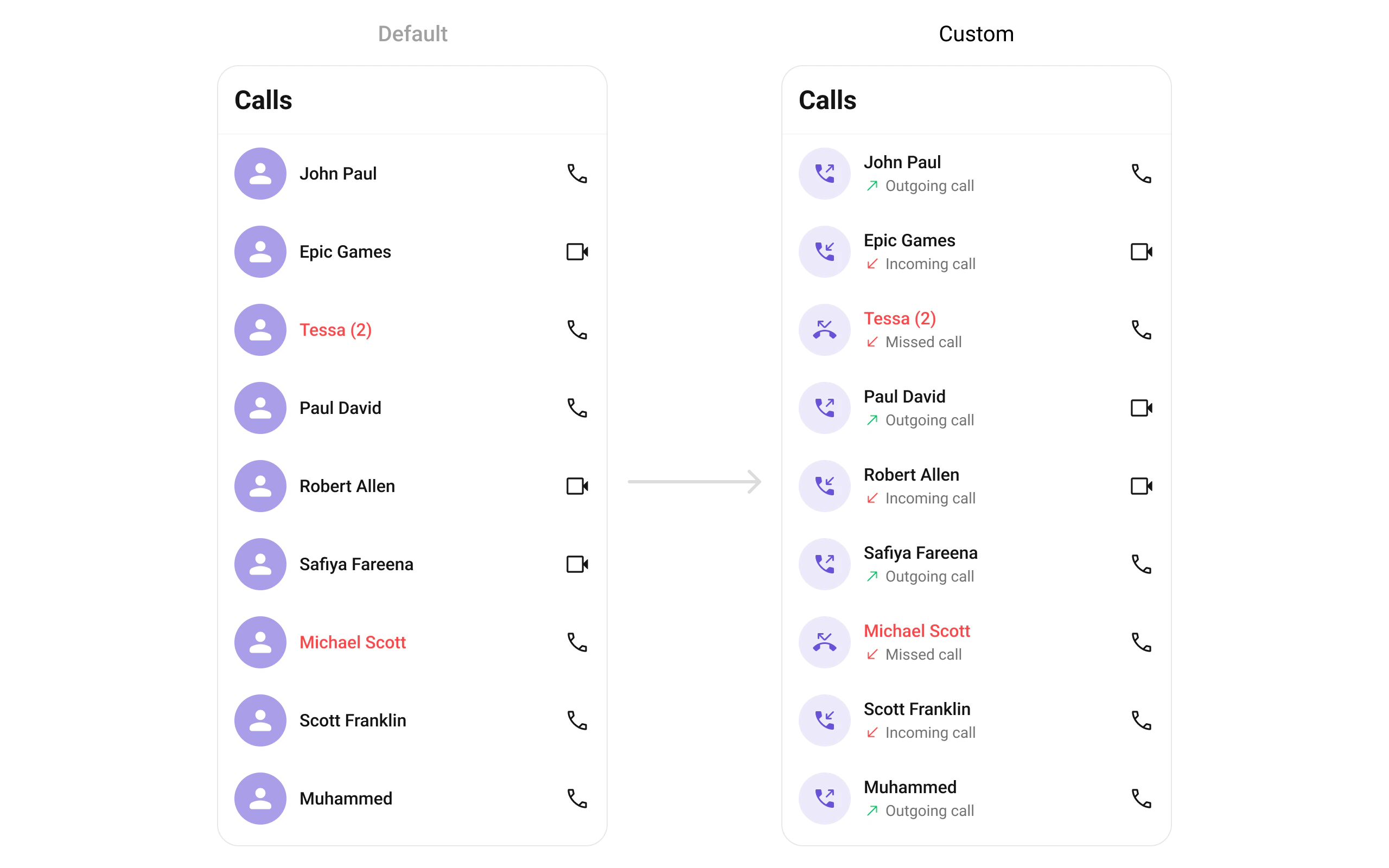
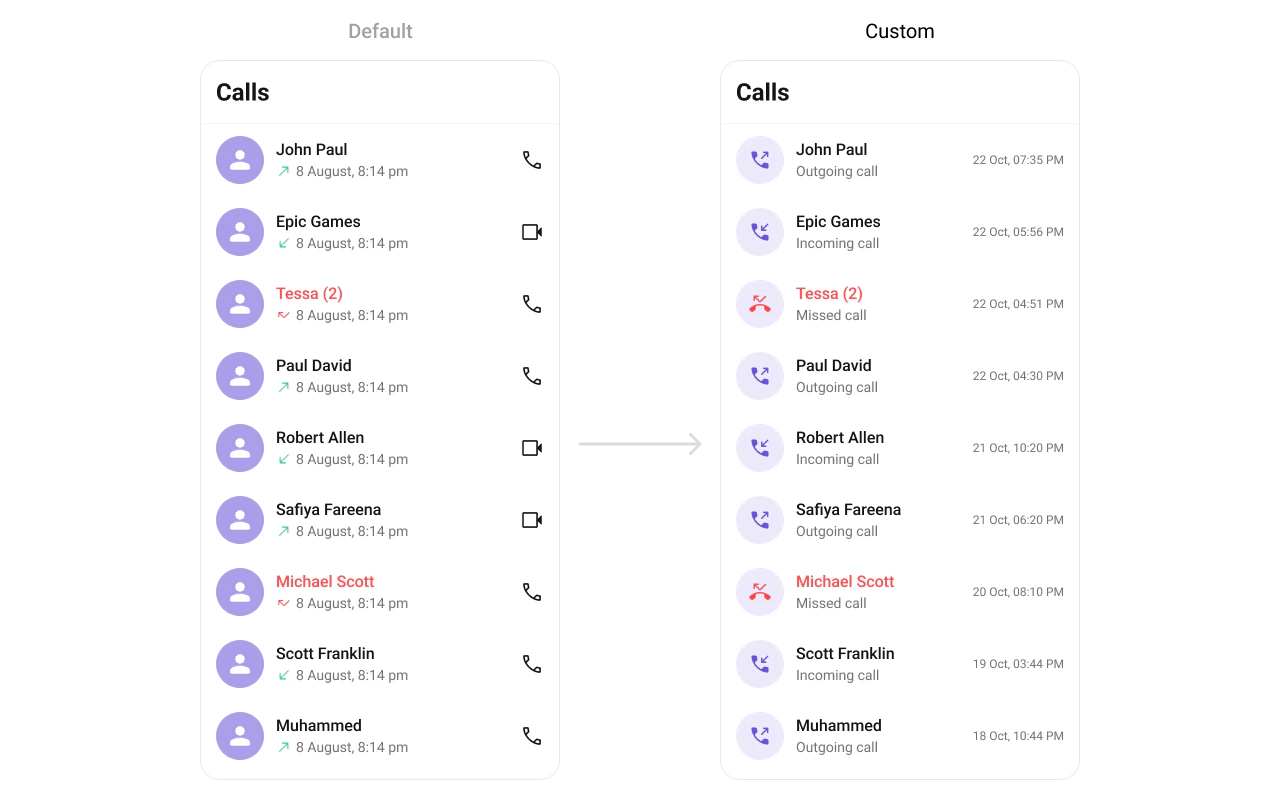
Custom View Slots Leading View Replace the avatar / left section.
Kotlin (XML Views)
Jetpack Compose
callLogs. setLeadingView ( object : CallLogsViewHolderListener () { override fun createView (context: Context , binding: CometchatListBaseItemsBinding ): View { return ImageView (context). apply { layoutParams = ViewGroup. LayoutParams ( 48 .dp, 48 .dp) } } override fun bindView ( context: Context , createdView: View , callLog: CallLog , holder: RecyclerView .ViewHolder, callLogList: List < CallLog >, position: Int ) { val imageView = createdView as ImageView // Load caller avatar } })
CometChatCallLogs ( leadingView = { callLog -> CometChatAvatar ( imageUrl = callLog.initiator?.avatar, name = callLog.initiator?.name ) } )
Title View Replace the name / title text.
Kotlin (XML Views)
Jetpack Compose
callLogs. setTitleView ( object : CallLogsViewHolderListener () { override fun createView (context: Context , binding: CometchatListBaseItemsBinding ): View { return TextView (context) } override fun bindView ( context: Context , createdView: View , callLog: CallLog , holder: RecyclerView .ViewHolder, callLogList: List < CallLog >, position: Int ) { (createdView as TextView).text = callLog.initiator?.name ?: "" } })
CometChatCallLogs ( titleView = { callLog -> Text ( text = callLog.initiator?.name ?: "" , style = CometChatTheme.typography.heading4Medium ) } )
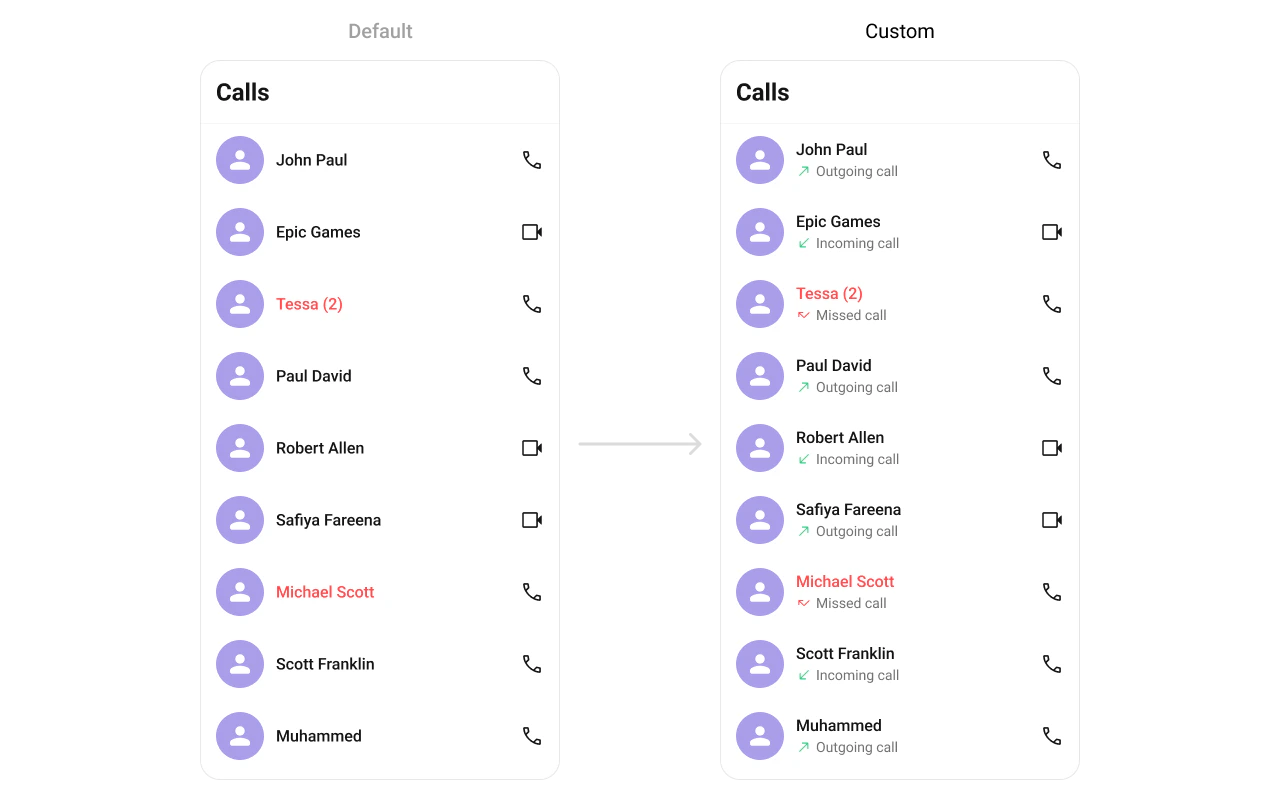
Subtitle View Replace the subtitle text below the caller’s name.
Kotlin (XML Views)
Jetpack Compose
callLogs. setSubtitleView ( object : CallLogsViewHolderListener () { override fun createView (context: Context , binding: CometchatListBaseItemsBinding ): View { return TextView (context). apply { maxLines = 1 ; ellipsize = TextUtils.TruncateAt.END } } override fun bindView ( context: Context , createdView: View , callLog: CallLog , holder: RecyclerView .ViewHolder, callLogList: List < CallLog >, position: Int ) { (createdView as TextView).text = callLog.status ?: "Unknown" } })
CometChatCallLogs ( subtitleView = { callLog -> Text ( text = callLog.status ?: "Unknown" , maxLines = 1 , overflow = TextOverflow.Ellipsis ) } )
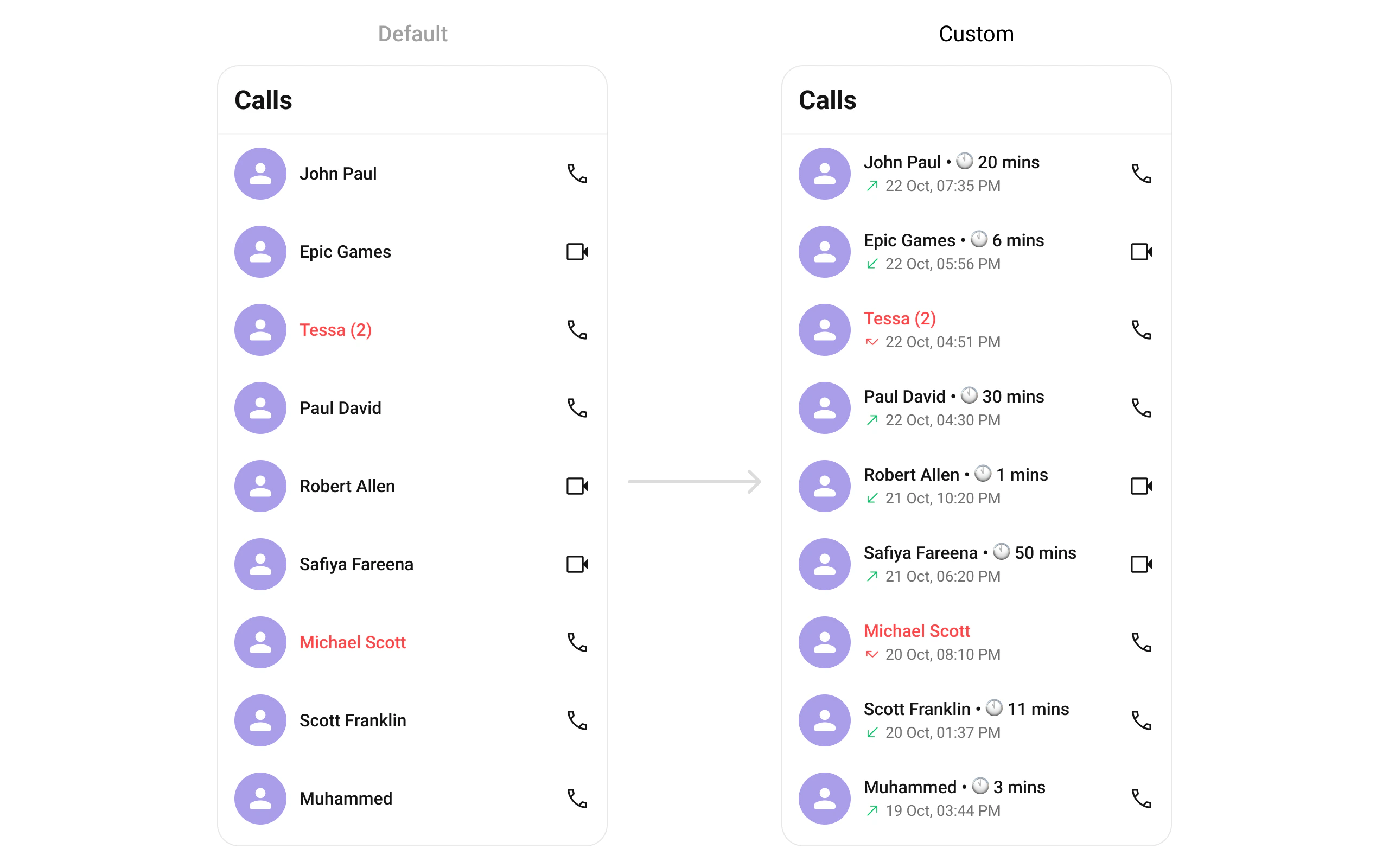
Trailing View Replace the right section of each call log item.
Kotlin (XML Views)
Jetpack Compose
callLogs. setTrailingView ( object : CallLogsViewHolderListener () { override fun createView (context: Context , binding: CometchatListBaseItemsBinding ): View { return TextView (context) } override fun bindView ( context: Context , createdView: View , callLog: CallLog , holder: RecyclerView .ViewHolder, callLogList: List < CallLog >, position: Int ) { (createdView as TextView).text = SimpleDateFormat ( "h:mm a" , Locale. getDefault ()) . format ( Date (callLog.initiatedAt * 1000 )) } })
CometChatCallLogs ( trailingView = { callLog -> Text ( text = SimpleDateFormat ( "h:mm a" , Locale. getDefault ()) . format ( Date (callLog.initiatedAt * 1000 )) ) } )
Item View Replace the entire list item row.
Kotlin (XML Views)
Jetpack Compose
callLogs. setItemView ( object : CallLogsViewHolderListener () { override fun createView (context: Context , binding: CometchatListBaseItemsBinding ): View { return LayoutInflater. from (context). inflate (R.layout.custom_call_log_item, null ) } override fun bindView ( context: Context , createdView: View , callLog: CallLog , holder: RecyclerView .ViewHolder, callLogList: List < CallLog >, position: Int ) { val avatar = createdView. findViewById < CometChatAvatar >(R.id.custom_avatar) val title = createdView. findViewById < TextView >(R.id.tvName) title.text = callLog.initiator?.name avatar. setAvatar (callLog.initiator?.name, callLog.initiator?.avatar) } })
CometChatCallLogs ( itemView = { callLog -> Row ( modifier = Modifier. fillMaxWidth (). padding ( 12 .dp), verticalAlignment = Alignment.CenterVertically ) { CometChatAvatar (imageUrl = callLog.initiator?.avatar, name = callLog.initiator?.name) Spacer (Modifier. width ( 12 .dp)) Column (modifier = Modifier. weight ( 1f )) { Text (callLog.initiator?.name ?: "" , style = CometChatTheme.typography.heading4Medium) Text (callLog.status ?: "" , style = CometChatTheme.typography.body3Regular) } } } )
State Views Kotlin (XML Views)
Jetpack Compose
callLogs. setEmptyView (R.layout.custom_empty_view) callLogs. setErrorView (R.layout.custom_error_view) callLogs. setLoadingView (R.layout.custom_loading_view)
CometChatCallLogs ( emptyView = { Text ( "No call logs" ) }, errorView = { onRetry -> Button (onClick = onRetry) { Text ( "Retry" ) } }, loadingView = { CircularProgressIndicator () } )
Kotlin (XML Views)
Jetpack Compose
callLogs. setOverflowMenu ( ImageButton (context). apply { setImageResource (R.drawable.ic_filter) setOnClickListener { /* show filter */ } })
CometChatCallLogs ( overflowMenu = { IconButton (onClick = { /* show filter */ }) { Icon ( painterResource (R.drawable.ic_filter), "Filter" ) } } )
Kotlin (XML Views)
Jetpack Compose
// Replace all options callLogs. setOptions { context, callLog -> listOf ( CometChatPopupMenu. MenuItem (id = "delete" , name = "Delete" , onClick = { /* ... */ }), CometChatPopupMenu. MenuItem (id = "callback" , name = "Call Back" , onClick = { /* ... */ }) ) } // Append to defaults callLogs. setAddOptions { context, callLog -> listOf ( CometChatPopupMenu. MenuItem (id = "info" , name = "Info" , onClick = { /* ... */ }) ) }
CometChatCallLogs ( options = { context, callLog -> listOf ( MenuItem (id = "delete" , name = "Delete" , onClick = { /* ... */ }), MenuItem (id = "callback" , name = "Call Back" , onClick = { /* ... */ }) ) }, addOptions = { context, callLog -> listOf ( MenuItem (id = "info" , name = "Info" , onClick = { /* ... */ })) } )
Common Patterns Minimal list — hide all chrome Kotlin (XML Views)
Jetpack Compose
callLogs. setToolbarVisibility (View.GONE) callLogs. setSeparatorVisibility (View.GONE)
CometChatCallLogs ( hideToolbar = true , hideSeparator = true )
Audio calls only Kotlin (XML Views)
Jetpack Compose
callLogs. setCallLogRequestBuilder ( CallLogRequest. CallLogRequestBuilder () . setCallType (CometChatConstants.CALL_TYPE_AUDIO) )
CometChatCallLogs ( callLogRequestBuilder = CallLogRequest. CallLogRequestBuilder () . setCallType (CometChatConstants.CALL_TYPE_AUDIO) )
Video calls only Kotlin (XML Views)
Jetpack Compose
callLogs. setCallLogRequestBuilder ( CallLogRequest. CallLogRequestBuilder () . setCallType (CometChatConstants.CALL_TYPE_VIDEO) )
CometChatCallLogs ( callLogRequestBuilder = CallLogRequest. CallLogRequestBuilder () . setCallType (CometChatConstants.CALL_TYPE_VIDEO) )
Advanced Methods ViewModel Access val factory = CometChatCallLogsViewModelFactory () val viewModel = ViewModelProvider ( this , factory) . get (CometChatCallLogsViewModel:: class .java)
Kotlin (XML Views)
Jetpack Compose
callLogs. setViewModel (viewModel)
CometChatCallLogs ( callLogsViewModel = viewModel )
See ViewModel & Data for ListOperations, state observation, and custom repositories.
Style Kotlin (XML Views)
Jetpack Compose
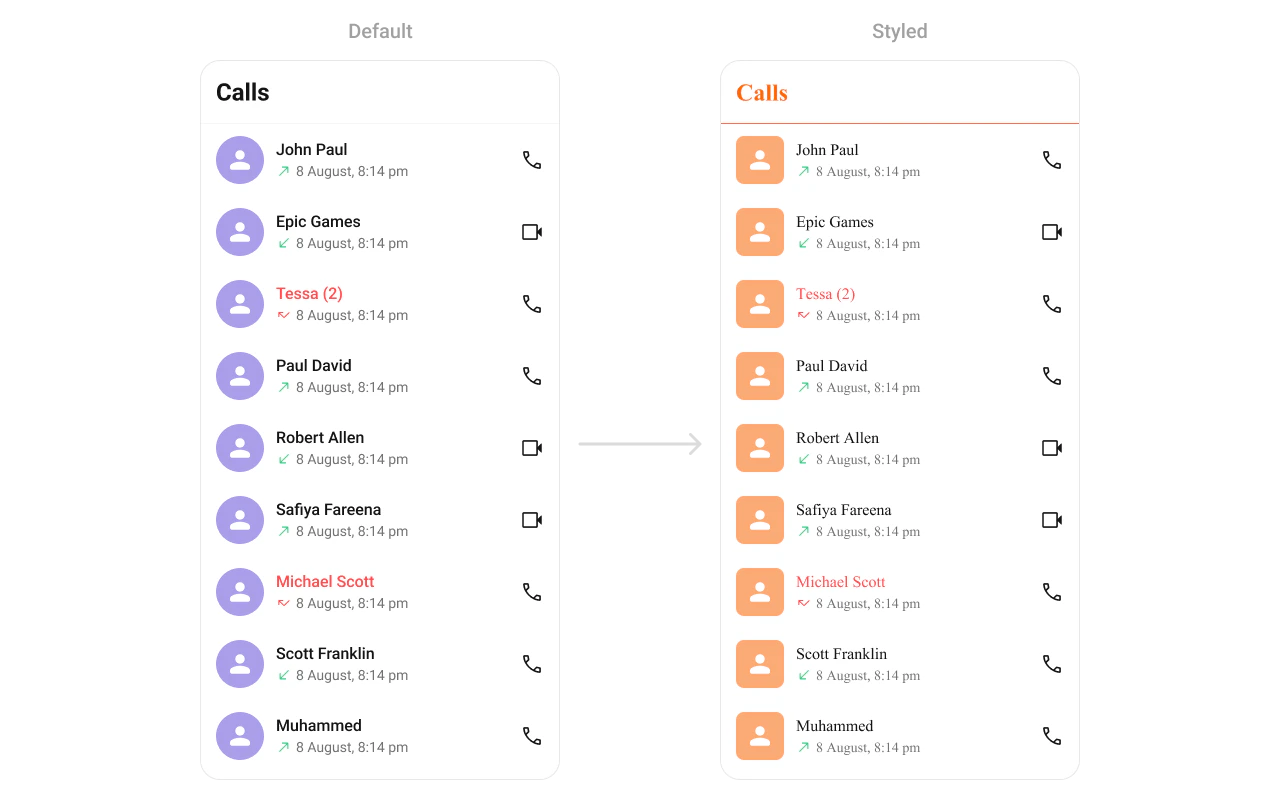
Define a custom style in themes.xml: < style name = "CustomCallLogsAvatarStyle" parent = "CometChatAvatarStyle" > < item name = "cometchatAvatarStrokeRadius" > 8dp </ item > < item name = "cometchatAvatarBackgroundColor" > #FBAA75 </ item > </ style > < style name = "CustomCallLogsStyle" parent = "CometChatCallLogsStyle" > < item name = "cometchatCallLogsAvatarStyle" > @style/CustomCallLogsAvatarStyle </ item > < item name = "cometchatCallLogsSeparatorColor" > #F76808 </ item > < item name = "cometchatCallLogsTitleTextColor" > #F76808 </ item > </ style > < style name = "AppTheme" parent = "CometChatTheme.DayNight" > < item name = "cometchatCallLogsStyle" > @style/CustomCallLogsStyle </ item > </ style >
CometChatCallLogs ( style = CometChatCallLogsStyle. default (). copy ( backgroundColor = Color ( 0xFFF5F5F5 ), titleTextColor = Color ( 0xFF141414 ), itemStyle = CometChatCallLogsItemStyle. default (). copy ( backgroundColor = Color.White, titleTextColor = Color ( 0xFF141414 ), subtitleTextColor = Color ( 0xFF727272 ), avatarStyle = CometChatAvatarStyle. default (). copy (cornerRadius = 12 .dp) ) ) )
Style Properties Property Description backgroundColorList background color titleTextColorToolbar title color itemStyle.backgroundColorRow background itemStyle.titleTextColorCaller name color itemStyle.subtitleTextColorCall status text color itemStyle.separatorColorRow separator color itemStyle.avatarStyleAvatar appearance
See Component Styling for the full reference.
Next Steps
Call Features Voice and video calling overview
Conversations Browse recent conversations
Component Styling Detailed styling reference with screenshots
ViewModel & Data Custom ViewModels, repositories, and ListOperations